
Jul 23, 2026 · 8 min read
Database vs Spreadsheet: When Should a Business Upgrade?
Compare a database vs spreadsheet for managing business data. Learn the signs that spreadsheets are limiting your workflow and what to use instead.
Services
Our service offers a team of engineers, designers, and QA specialists to achieve your goals.
See how it worksYou gain a team of experts including engineers, designers, and QA who drive your project.
See what our Dev team can build for you
When choosing software for your business, the decision is not only about features. It is also about cost, control, flexibility, security, support, and long-term scalability.
That is why many teams compare open source vs proprietary software before deciding what to use, customize, or build.
Open source software gives users access to the source code. Proprietary software, also called closed source software, is owned and controlled by a vendor. Both models can be useful, but they solve different business needs.
This guide explains the difference between open source and proprietary software, the advantages of each, and how to know which option is right for your business.
If you are also comparing custom software, SaaS, and ready-made tools, read our full guide on custom software vs off-the-shelf software.
Open source software is software whose source code is publicly available. This means developers can inspect, modify, improve, and sometimes redistribute the software, depending on its license.
Popular examples of open source software include Linux, WordPress, PostgreSQL, MySQL, Apache, Docker, Kubernetes, Python, and React.
The biggest advantage of open source software is control. Your team can see how the software works, adapt it to your needs, and build on top of it if you have the right technical expertise.
However, open source does not always mean completely free. Even when there is no license fee, your business may still pay for hosting, setup, customization, security, maintenance, updates, and developer support.
So, open source should not be judged only by its starting cost. It should be judged by whether it gives your business the right level of flexibility and control.
Proprietary software is software owned by a company, vendor, or rights holder. The user pays to access and use the software, but the source code is usually private.
Examples include Microsoft Office, Adobe Photoshop, Salesforce, QuickBooks, Slack, Zoom, Oracle Database, and many SaaS platforms.
Proprietary software is usually easier to start with because it is already built, packaged, supported, and maintained by the vendor. This makes it useful for businesses that want a ready-made solution without managing the technical side.
The trade-off is control. Your business depends on the vendor for updates, pricing, support, integrations, and new features.
For a deeper explanation, read our guide on what proprietary software means with examples.
The main difference between open source and proprietary software is source code access.
Open source software allows users to view and modify the code. Proprietary software keeps the code private and controlled by the vendor.
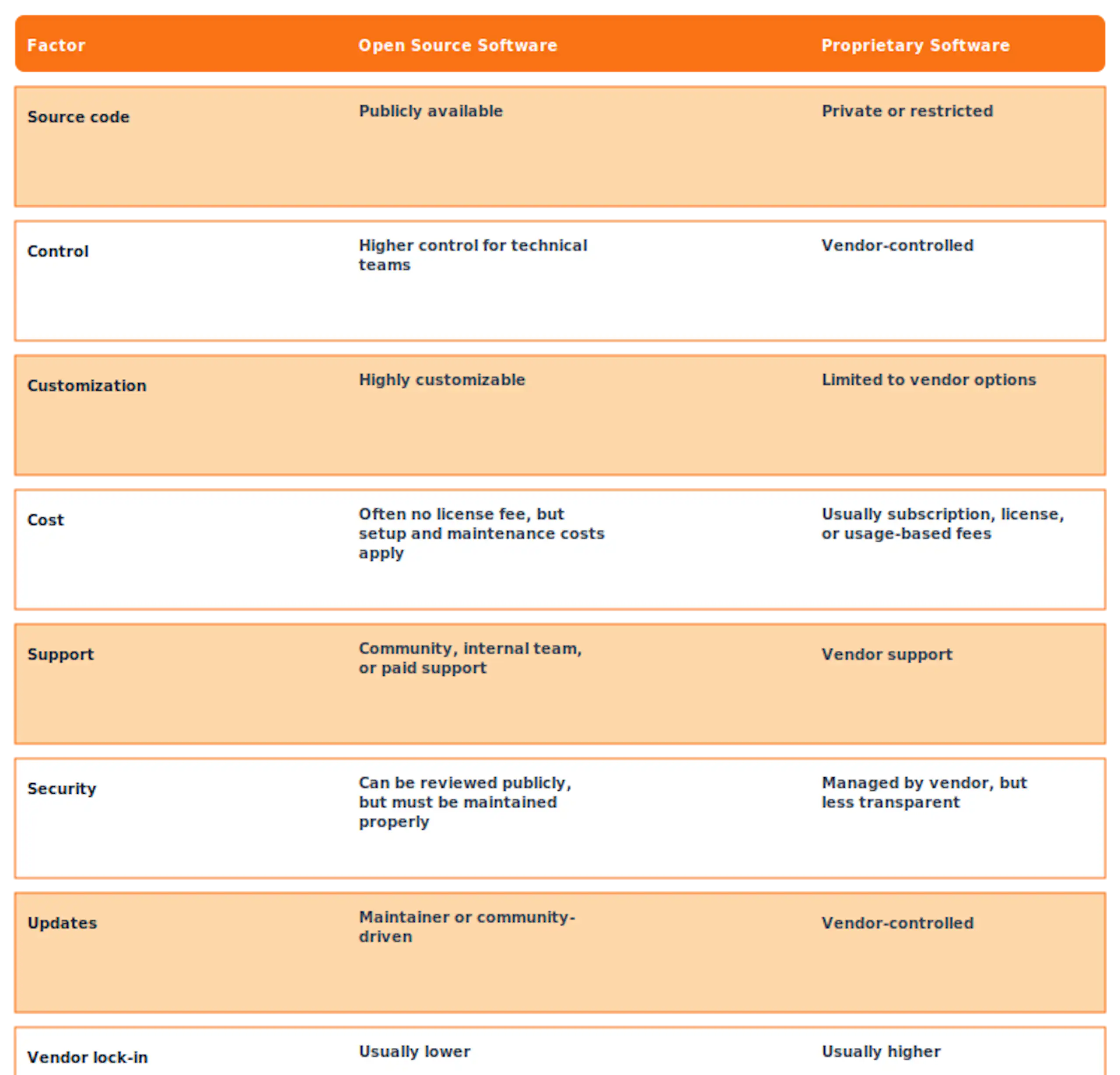
Both models can work well. The right choice depends on your business needs, technical capacity, budget, and how important the software is to your operations.
The phrase open source vs closed source software is often used when comparing open source and proprietary software.
Closed source software means the source code is not available to users. You can use the product, but you cannot change how it works beyond the settings and features the vendor provides.
This matters because source code access affects how much control your business has.
With open source software, your team may be able to customize workflows, build integrations, fix issues, and avoid being fully dependent on one vendor.
With closed source software, your business gets convenience and vendor support, but you must work within the vendor’s limits.
This is not always a problem. Many businesses should use closed source tools for common functions like accounting, email, communication, file storage, payroll, and basic CRM. But when a tool supports a strategic workflow, limited control can become a serious constraint.
The difference between open source and proprietary software is not only technical. It affects cost, support, flexibility, and long-term business decisions.
1. Ownership and Control
Open source software gives your business more control because the source code is available. If your team has the right skills, you can modify the software and adapt it to your process.
Proprietary software gives the vendor more control. You can use the product, but the vendor decides the roadmap, pricing, features, and limitations.
2. Cost
Open source software can reduce licensing costs, especially when many users need access. But you may still need to pay for implementation, hosting, support, security, and maintenance.
Proprietary software often has a clearer starting cost, such as a monthly subscription or annual license. However, the cost can increase as you add users, upgrade plans, or need advanced features.
The better question is not “Which is cheaper today?” It is “Which option has the better total cost over time?”
3. Customization
Open source software is usually easier to customize because developers can access and modify the code.
Proprietary software usually allows configuration, not full customization. You may be able to change settings, workflows, dashboards, and templates, but you cannot rewrite the core product.
If your business has unique workflows, open source or custom software may be a better fit.
4. Support
Proprietary software usually comes with vendor support, documentation, onboarding, and service agreements.
Open source support depends on the project. Some open source tools have strong communities and paid enterprise support. Others may have limited documentation or slow updates.
Before adopting open source software, check whether it is actively maintained and whether your team can support it long term.
5. Security
Open source software can be secure because the code can be reviewed by developers and the wider community. But it still needs proper setup, updates, monitoring, and maintenance.
Proprietary software can also be secure because vendors often invest in infrastructure, compliance, and security teams. However, users usually cannot inspect the source code directly.
Neither model is automatically safer. Security depends on the specific software, how well it is maintained, and how responsibly it is used.
The main advantages of open source vs proprietary software are flexibility, transparency, customization, lower licensing costs, and reduced vendor dependency.
Open source software is often a strong choice when your business needs more control over how the software works. It is also useful when you want to build on top of an existing foundation instead of developing everything from scratch.
For example, a company may use an open source framework, database, or CMS as the base for a custom internal platform or customer-facing application.
Open source can be especially valuable when:
The key is to treat open source as a strategic tool, not simply as free software.
Proprietary software is often the better choice when your business needs speed, simplicity, and structured support.
Because the software is already built and maintained by a vendor, your team can usually start using it faster. You do not need to manage hosting, infrastructure, updates, or technical maintenance in most cases.
Proprietary software can be especially useful when:
For standard business functions, proprietary software can save time and reduce operational burden.
Open source software may be the better choice when flexibility and control matter more than convenience.
Choose open source when your business needs customization, source code access, strong integration flexibility, or lower vendor dependency.
It is also a good option when you have developers or a trusted technical partner who can manage setup, customization, maintenance, and security.
Open source is powerful, but it works best when someone is responsible for keeping it stable and secure.
Proprietary software may be the better choice when your business needs a ready-made tool that works quickly.
Choose proprietary software when the workflow is standard, the product already solves the problem, and your team does not need access to the source code.
This is often the right option for accounting, payroll, design tools, communication tools, basic project management, and other common business needs.
The main risk is vendor lock-in. Before choosing a proprietary platform, check whether you can export your data, connect it with other tools, and switch later if needed.
The decision is not always open source or proprietary software.
Many businesses need a hybrid approach.
You may use proprietary software for common tasks, open source software for flexible technical foundations, and custom software for workflows that are specific to your business.
For example, a company might use a proprietary CRM, an open source database, and a custom dashboard that connects sales, operations, and customer data in one place.
This approach helps you avoid building everything from scratch while still giving your business control where it matters most.
If your team is unsure what to buy, what to use open source for, and what to build, Wazobia Technologies can help you plan the right path through a software development partnership.
The best software strategy is not always one model. It is choosing the right model for each part of your business.
Use proprietary software where it already solves the problem well. Use open source where control and flexibility matter. Build custom software where your business needs something designed around how it actually works.
The open source vs proprietary software decision is not about which model is always better. It is about choosing the right level of control, cost, support, and flexibility for your business.
Open source gives you more freedom and customization potential. Proprietary software gives you convenience, support, and faster adoption.
For many businesses, the best answer is a balanced software strategy that uses both models where they make sense.
If your current tools are limiting your workflow, creating manual work, or making it harder to scale, it may be time to review your software options.
Book a free strategy call with Wazobia Technologies to explore the right software approach for your next stage of growth.
1. What is the main difference between open source and proprietary software?
The main difference is source code access. Open source software allows users to view and modify the code. Proprietary software keeps the code private and controlled by the vendor.
2. Is proprietary software the same as closed source software?
In most cases, yes. Proprietary software is usually closed source because users cannot freely access, modify, or redistribute the source code.
3. What are the advantages of open source vs proprietary software?
The main advantages are flexibility, transparency, customization, lower licensing costs, and reduced vendor dependency.
4. Is open source software always free?
No. Many open source tools are free to download, but businesses may still pay for setup, hosting, customization, support, security, and maintenance.
5. Which is better for business: open source or proprietary software?
It depends on the business need. Open source is better for flexibility and control. Proprietary software is better for speed, ease of use, and vendor support.
Keep Reading
Jul 23, 2026 · 8 min read
Compare a database vs spreadsheet for managing business data. Learn the signs that spreadsheets are limiting your workflow and what to use instead.

Jul 23, 2026 · 9 min read
Compare SQL vs NoSQL databases by structure, transactions, scalability and use case. Learn which architecture is right for your application.
.jpg_7DAeB8?tr=w-2560,f-webp,q-50)
Jul 23, 2026 · 8 min read
Find the best database for web applications based on SaaS, ecommerce, marketplace, real-time and content use cases. Compare the practical trade-offs.
© Wazobia Technologies 2026