
Jul 23, 2026 · 8 min read
Database vs Spreadsheet: When Should a Business Upgrade?
Compare a database vs spreadsheet for managing business data. Learn the signs that spreadsheets are limiting your workflow and what to use instead.
Services
Our service offers a team of engineers, designers, and QA specialists to achieve your goals.
See how it worksYou gain a team of experts including engineers, designers, and QA who drive your project.
See what our Dev team can build for you

When we talk about IT infrastructure, we're talking about the invisible backbone that keeps every organization running, from Fortune 500 companies to growing startups. Yet many business owners and decision-makers treat it as something technical that "the IT team handles," missing critical opportunities to optimize costs, improve security, and unlock competitive advantages.
This guide exists because we've seen what happens on both sides. We've worked with organizations that struggled because their IT infrastructure couldn't scale. We've also worked with companies that invested strategically in the right infrastructure and saw measurable improvements in productivity, security, and bottom-line performance.
In this comprehensive guide, we'll demystify IT infrastructure. You'll learn what it actually is, why it matters for your business, how to design systems that support growth, and what changes are coming that could affect your strategy.
By the end of this article, you'll understand:
Let's start with fundamentals.
Information Technology (IT) Infrastructure refers to the complete set of hardware, software, networks, and facilities that enable an organization to deliver IT services, run applications, and manage data effectively.
Think of it like this: If your business is a living organism, IT infrastructure is the circulatory, nervous, and skeletal system combined. It delivers resources (like blood), transmits information (like nerves), and provides structure and support (like bones).
More practically, IT infrastructure includes:
The modern definition of IT infrastructure has expanded beyond traditional "servers and data centers." Today's infrastructure is hybrid, combining on-premises systems with cloud services, edge computing, and distributed resources. A business might have physical servers in their office, databases in AWS, applications in Azure, and storage in Google Cloud, all working seamlessly together.
This complexity is why understanding IT infrastructure has moved from "IT department only" to "business-critical knowledge for leaders."
1. Operational Reliability and Uptime
When infrastructure fails, everything stops. A financial services firm losing access to systems for even two hours could face regulatory penalties, lost trades, and damaged reputation. A retail business with a down e-commerce site loses direct revenue.
Well-designed IT infrastructure ensures:
2. Security and Data Protection
Data breaches are costly and commonplace. The average data breach now costs $4.45 million. Infrastructure in your first line of defense should includes:
Your infrastructure either makes security possible or makes it nearly impossible, regardless of other efforts.
3. Scalability and Business Growth
Growing businesses hit infrastructure walls constantly. You add 50 new employees and suddenly everyone complains about slow systems. You launch a new product feature and the database can't handle the traffic.
Good IT infrastructure scales elastically, you can add resources when you need them and reduce them when you don't, without complete system overhauls.
4. Cost Efficiency
This might surprise you: proper IT infrastructure often costs less than poor infrastructure, when you factor in downtime, security breaches, emergency fixes, and inefficiency.
5. Competitive Advantage
Companies with superior IT infrastructure can:
IT infrastructure consists of several interconnected layers. Understanding each helps you see how they support your organization.
Layer 1: Hardware – The Physical Foundation
Hardware comprises the physical devices that process, store, and transmit information.
Key hardware components:
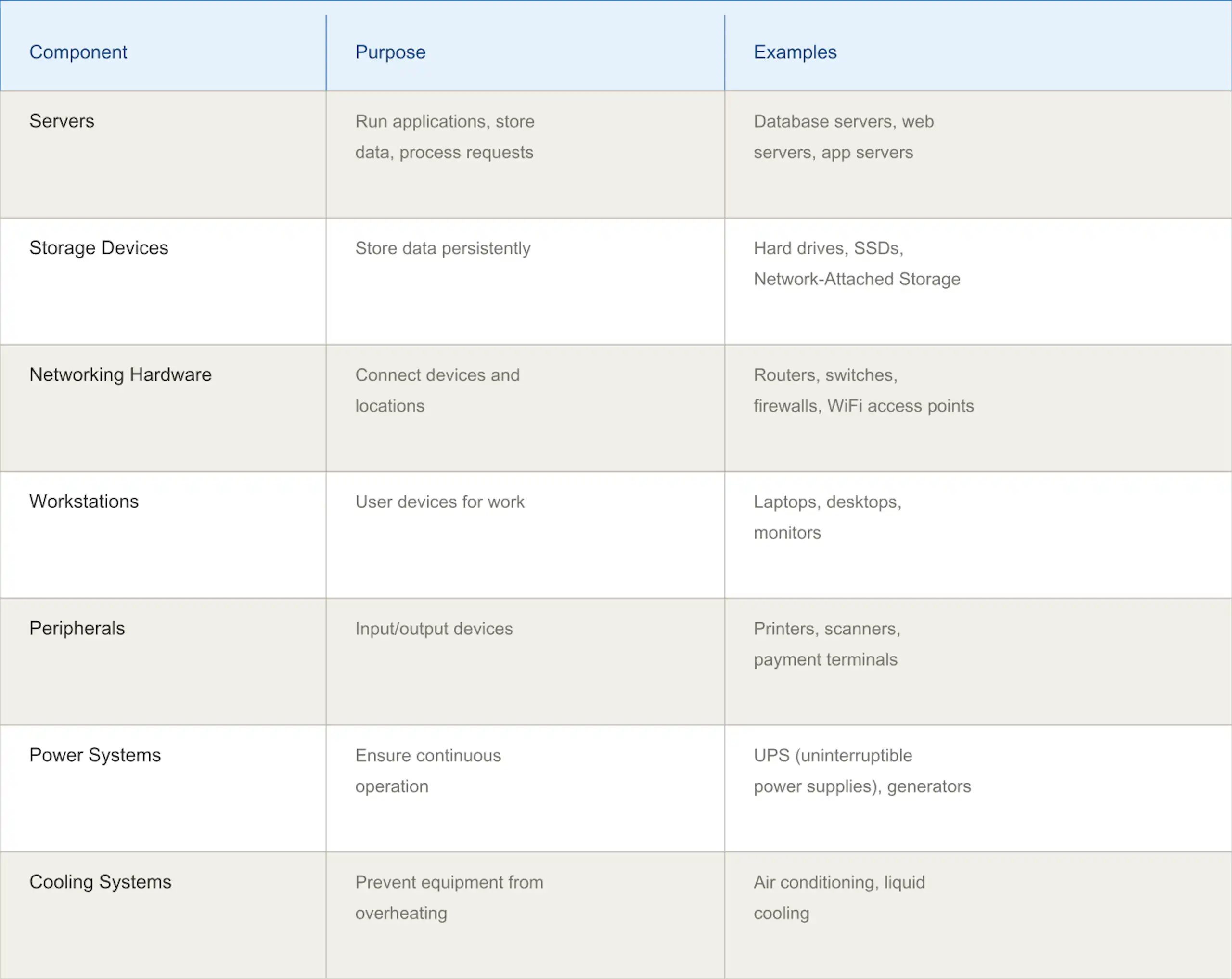
How they work together: A user on a laptop (workstation) connects through WiFi (networking) to reach a database (server) that stores files on SSDs (storage), all powered by UPS systems (power) and kept cool by AC (cooling).
Layer 2: Software – The Intelligence Layer
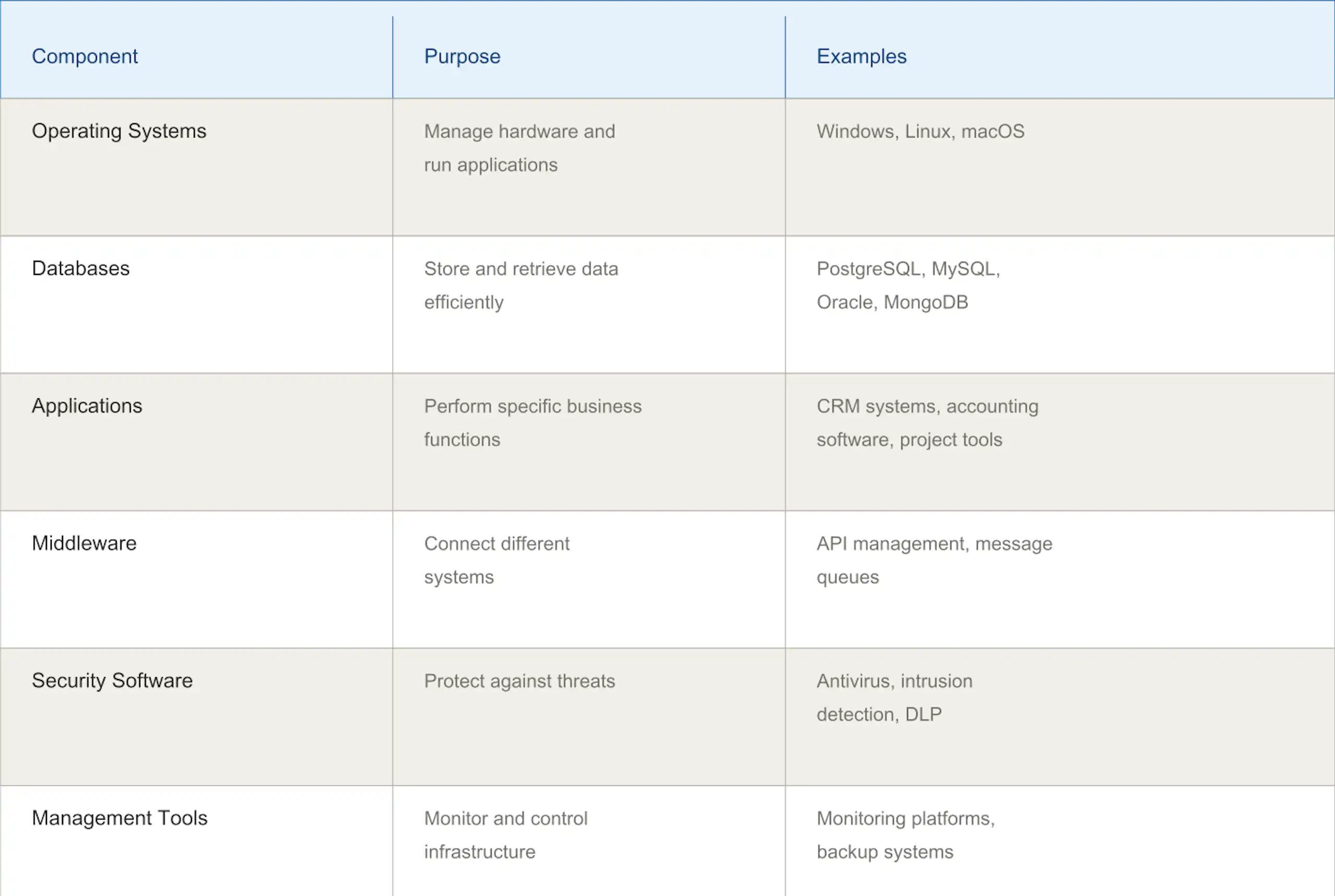
Software provides the instructions that tell hardware what to do.
Key software components:
Layer 3: Networking – The Connective Tissue
Networks allow all components to communicate. Without proper networking, individual powerful systems are useless.
Key networking components:
Layer 4: Data Management – The Memory System
How you store, organize, and protect data determines whether information is an asset or a liability.
Key elements:
Layer 5: Security – The Protective Layer
Security isn't one component, it's woven throughout infrastructure.
Key security elements:
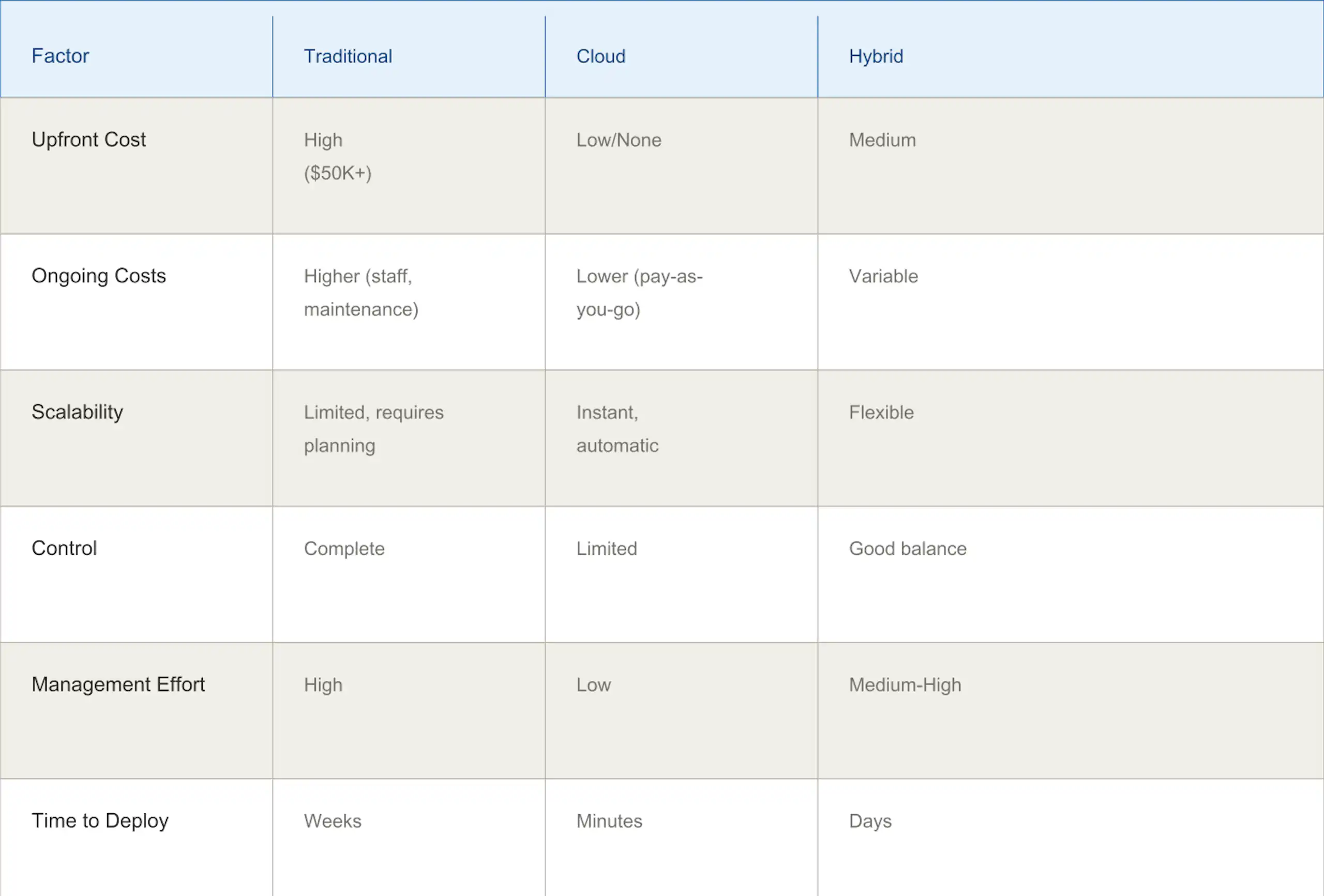
Organizations typically deploy infrastructure using three models (or combinations thereof).
You own and operate everything in your facility.
Characteristics:
Best for:
Cost example: A business might spend $50,000-$100,000 on servers, plus $20,000+/year in maintenance.
Your systems run on servers managed by a cloud provider (AWS, Azure, Google Cloud, etc.).
Characteristics:
Best for:
Cost example: Same infrastructure might cost $2,000-$3,000/month on cloud—no upfront investment.
A combination of on-premises and cloud systems.
Characteristics:
Best for:
Real-world example: A bank might keep customer databases on-premises (regulatory requirement) while running web applications in cloud (scalability) and backing everything up in cloud (disaster recovery).
How infrastructure needs vary significantly by industry. Understanding these helps you see how infrastructure decisions connect to business objectives.
Financial Services
Infrastructure priorities: Security, compliance, uptime, speed
Typical setup:
Why it matters: A system outage during market hours means lost trades and regulatory penalties. A data breach could expose customer financial information.
Infrastructure investments: Often 10-15% of IT budget goes to infrastructure redundancy and security.
E-Commerce and Retail
Infrastructure priorities: Scalability, performance, uptime during peak seasons
Typical setup:
Why it matters: Black Friday/Cyber Monday means 10-50x normal traffic. Infrastructure that can't scale means customers can't buy (revenue loss).
Real scenario: Shopify's infrastructure automatically scales from handling millions of daily transactions to billions during holiday periods.
Healthcare
Infrastructure priorities: Security, compliance, availability, patient safety
Typical setup:
Why it matters: Downtime literally impacts patient care. Data breaches expose sensitive medical information.
Compliance cost: Healthcare organizations spend significantly more on infrastructure security and compliance than other industries.
Manufacturing
Infrastructure priorities: Reliability, edge computing, real-time control
Typical setup:
Why it matters: Production line downtime is extremely expensive (loses revenue, disrupts downstream customers).
Emerging trend: Manufacturers increasingly use predictive analytics on infrastructure data to anticipate failures before they happen.
Media and Entertainment
Infrastructure priorities: Performance, bandwidth, global delivery
Typical setup:
Why it matters: Netflix streams to 250+ million users simultaneously. One performance issue affects millions.
If you're building new infrastructure or modernizing existing systems, here's a practical approach.
Phase 1: Assessment & Planning (Weeks 1-2)
Questions to answer:
Output: Infrastructure requirements document (what you need, why you need it, constraints)
Phase 2: Design (Weeks 2-4)
Create your architecture:
Output: Infrastructure design document (technical specifications, architecture diagrams, security plan, disaster recovery plan)
Phase 3: Implementation (Weeks 4-12)
Build your infrastructure:
Phase 4: Optimization & Management (Ongoing)
Run your infrastructure:
These terms get confused because infrastructure touches so many areas.
IT Infrastructure vs. IT Operations
IT Infrastructure: The systems and components themselves (hardware, software, networks)
IT Operations: The process of keeping infrastructure running (monitoring, maintaining, fixing problems)
Analogy: Infrastructure is a car; IT Operations is the person driving and maintaining it.
IT Infrastructure vs. Network Infrastructure
IT Infrastructure: Everything hardware, software, data, facilities
Network Infrastructure: Just the networking components (routers, switches, cables, WiFi)
Relationship: Network is a critical component of IT infrastructure, not the whole thing.
IT Infrastructure vs. Cloud Infrastructure
IT Infrastructure: The overall framework (can be on-premises, cloud, or hybrid)
Cloud Infrastructure: A specific type of IT infrastructure where resources are managed by a cloud provider
Analogy: All cloud infrastructure is IT infrastructure, but not all IT infrastructure is cloud.
IT Infrastructure vs. IT Architecture
IT Infrastructure: The actual physical and logical systems
IT Architecture: The design and blueprint for those systems
Relationship: Architecture is the plan; infrastructure is the implementation.

Once you've built infrastructure, you need to manage it. This involves three interconnected disciplines:
1. IT Operations Management (ITOM)
Focus: Keeping systems available, reliable, and performing
Includes:
Tools: Nagios, Datadog, New Relic, Splunk
2. IT Service Management (ITSM)
Focus: Managing IT services through their full lifecycle
Includes:
Framework: ITIL (Information Technology Infrastructure Library) provides best practices
3. IT Asset Management (ITAM)
Focus: Managing hardware and software assets
Includes:
IT infrastructure is evolving rapidly. Understanding these trends helps with long-term planning.
1. Edge Computing
Data processing moving closer to the source (sensors, devices) rather than centralized data centers.
Why it matters:
Example: Self-driving cars process video locally on edge devices rather than sending everything to the cloud.
Impact on your strategy: If you have IoT devices or real-time requirements, edge computing is becoming essential.
2. Containerization and Kubernetes
Moving from "virtual machines" to "containers" lighter, faster, more efficient deployment.
Why it matters:
Adoption trend: 90%+ of enterprises now use containerization for new applications.
Impact: Reduces infrastructure costs and increases agility.
3. AI-Driven Infrastructure Management
AI monitoring and optimizing infrastructure automatically.
Emerging capabilities:
Timeline: Already here for early adopters, becoming mainstream in 2025-2026.
4. Sustainability and Green Infrastructure
Environmental impact becoming a business consideration.
Trends:
Impact: May affect infrastructure location and technology choices.
5. Distributed Infrastructure
Moving from one data center to distributed across multiple locations, clouds, and edge devices.
Why it matters:
Challenge: More complex to manage, requires new tools and approaches.

Use this checklist to assess your infrastructure against best practices.
Architecture & Design
Reliability & Uptime
Performance
Security
Cost & Efficiency
Compliance & Governance
Team & Skills
Future-Readiness
If you've made it this far, you've likely gone from thinking "IT infrastructure is just IT's problem" to understanding it's deeply connected to your business success.
Here's what we want you to remember:
First: Infrastructure is investment, not cost. A $100,000 investment in proper infrastructure might prevent a $500,000 disaster or unlock $1,000,000 in new revenue opportunity.
Second: Infrastructure decisions compound over time. The choice you make today (cloud vs. on-premises, for example) affects your capabilities, costs, and flexibility for years.
Third: You don't need to understand every technical detail, but you should understand the strategic implications. What's your infrastructure strategy? Does it support your business strategy?
Fourth: Infrastructure is increasingly democratized. Small startups can access the same infrastructure capabilities as enterprises. Your competitive advantage comes from how well you use infrastructure, not how much you spend.
Finally: Infrastructure is a moving target. The landscape changes constantly. What works today might be suboptimal tomorrow. Build with flexibility in mind.
If your infrastructure is struggling, we recommend:
At Wazobia Technologies, we've helped dozens of organizations transform their infrastructure from a limiting factor into a competitive advantage. Get a free consultation if you'd like to discuss your specific situation, whether you're modernizing legacy systems, building cloud-native applications, or optimizing what you have, we're here to help.
Your infrastructure doesn't have to be perfect today. But it should be moving in the right direction.
Q: How often should we update our IT infrastructure?
Infrastructure isn't a "set it and forget it" investment. Review your architecture annually, update security patches monthly or more frequently, and plan for technology refreshes every 3-5 years.
Q: What's the difference between IT infrastructure and IT services?
Infrastructure is the foundation (systems, hardware, networks). IT services are what you build on top (applications, support, tools).
Q: Is cloud always cheaper than on-premises?
Not always. Cloud is usually cheaper for variable workloads and organizations without IT expertise. On-premises can be cheaper for stable, consistent workloads at enterprise scale. Hybrid often provides the best balance.
Q: How do we calculate ROI on infrastructure investments?
Consider avoided costs (prevented downtime, security breaches), revenue enabled (scalability allowing new products), and efficiency gains (reduced manual work). Many infrastructure investments pay for themselves within 2-3 years.
Q: What should we prioritize first: security, performance, or scalability?
All three are critical. But typically: security first (breaches are expensive and reputationally damaging), then reliability/performance (downtime costs revenue), then scalability (growth is nice, but only if you're secure and reliable).
Keep Reading
Jul 23, 2026 · 8 min read
Compare a database vs spreadsheet for managing business data. Learn the signs that spreadsheets are limiting your workflow and what to use instead.

Jul 23, 2026 · 9 min read
Compare SQL vs NoSQL databases by structure, transactions, scalability and use case. Learn which architecture is right for your application.
.jpg_7DAeB8?tr=w-2560,f-webp,q-50)
Jul 23, 2026 · 8 min read
Find the best database for web applications based on SaaS, ecommerce, marketplace, real-time and content use cases. Compare the practical trade-offs.
© Wazobia Technologies 2026
