
Jul 23, 2026 · 8 min read
Database vs Spreadsheet: When Should a Business Upgrade?
Compare a database vs spreadsheet for managing business data. Learn the signs that spreadsheets are limiting your workflow and what to use instead.
Services
Our service offers a team of engineers, designers, and QA specialists to achieve your goals.
See how it worksYou gain a team of experts including engineers, designers, and QA who drive your project.
See what our Dev team can build for you

In software development, it is not enough to know what a system should do. You also need to define how well it should do it.
That is the main difference between functional and non-functional requirements.
Functional requirements describe the features, actions, and behaviours a software system must deliver. Non-functional requirements describe the quality standards the system must meet, such as speed, security, reliability, usability, scalability, accessibility, and performance.
Both are important. A product can have the right features and still fail if it is slow, insecure, confusing, or difficult to maintain. In the same way, a fast and secure system is not useful if it does not perform the tasks users need.
This guide explains functional vs non-functional requirements, the key differences, practical examples, and how to write both clearly before development begins.
Functional requirements define what a software system must do.
They describe the features, workflows, inputs, outputs, rules, and system behaviours that users expect from the product. In simple terms, they explain the actions users should be able to perform and how the system should respond.
For example, if you are building a customer portal, functional requirements may include account registration, login, profile updates, payment processing, ticket creation, file uploads, and email notifications.
A functional requirement usually answers questions like:
Good functional requirements are clear and testable. They help developers understand what to build, help designers map user journeys, and help QA teams confirm whether the system behaves as expected.
Here are practical functional requirements examples for common software systems:
Each example describes something the software must do. That is the easiest way to identify a functional requirement.
Non-functional requirements define how well a software system should work.
They do not usually describe a single feature. Instead, they describe the quality, performance, security, usability, reliability, and operational standards the software must meet.
For example, “the system shall allow users to log in” is a functional requirement. But “the login page shall load within two seconds for 95% of users” is a non-functional requirement.
Non-functional requirements answer questions like:
Microsoft’s Azure Architecture Centre also frames non-functional requirements around how well an application performs a task, including performance, availability, scalability, and cost management. You can see this in its guidance on designing systems that meet functional and non-functional business requirements.
These requirements are often missed during early planning because they can feel technical. But they have a major impact on the final product. They influence architecture, infrastructure, testing, security controls, user experience, and long-term maintenance.
When non-functional requirements are unclear, teams may build software that works during a demo but struggles in real business use.
Non-functional requirements can cover many quality areas. The most common include:
Performance requirements: Define speed, response time, throughput, and processing limits.
Scalability requirements: Define how the system should handle growth in users, data, traffic, or transactions.
Security requirements: Define how the system protects users, data, access, and transactions.
Availability requirements: Define how often the system must be accessible and operational.
Reliability requirements: Define how consistently the system should work without failure.
Usability requirements: Define how easy and efficient the system should be for users.
Accessibility requirements: Define how well the system supports users with disabilities. For web products, the W3C Web Content Accessibility Guidelines are a useful reference for accessibility expectations.
Maintainability requirements: Define how easy the system should be to update, debug, improve, and support.
Compliance requirements: Define legal, regulatory, or industry standards the system must meet.
Here are clear non functional requirements examples:
These examples focus on quality, limits, standards, and operating conditions. They do not describe new user-facing features. They describe how well the system must behave.
The simplest difference between functional and non-functional requirements is this:
Functional requirements define what the system must do.
Non-functional requirements define how well the system must do it.
Both work together. Functional requirements shape the features. Non-functional requirements shape the quality of those features.
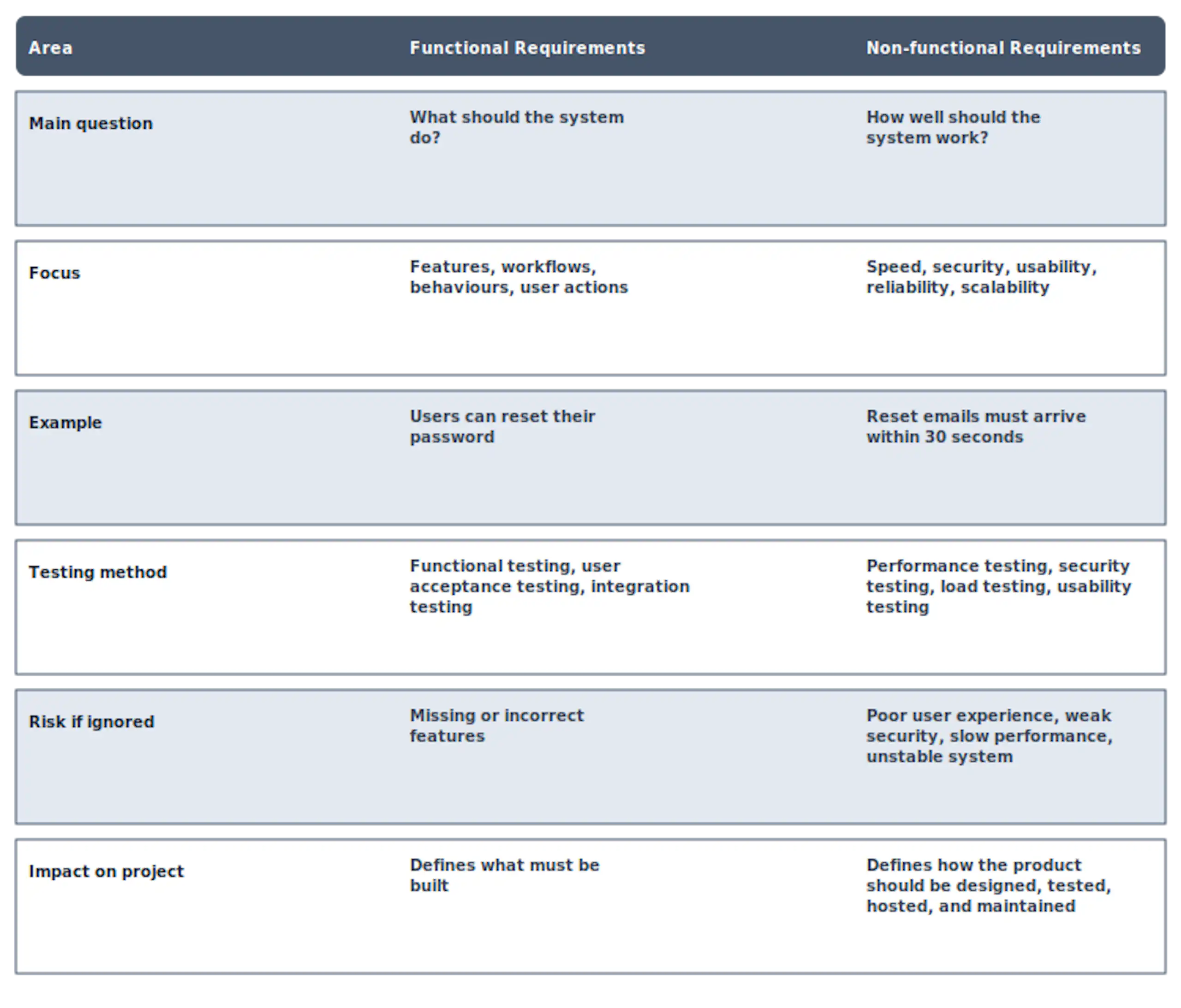
A useful way to think about it is this:
If the requirement describes an action or feature, it is probably functional. If it describes a quality level, constraint, or standard, it is probably non-functional.
The difference becomes clearer when you compare both side by side.
For a login system:
Functional requirement: The system shall allow users to log in with their email address and password.
Non-functional requirement: The login request shall complete within two seconds for 95% of users.
For an ecommerce checkout:
Functional requirement: The system shall allow customers to pay using debit card, credit card, and bank transfer.
Non-functional requirement: The payment process shall be encrypted and meet applicable payment security standards.
For a reporting dashboard:
Functional requirement: The system shall allow managers to generate monthly revenue reports.
Non-functional requirement: Reports covering up to 12 months of data shall generate within 10 seconds.
For a file upload feature:
Functional requirement: The system shall allow users to upload PDF, PNG, and JPG files.
Non-functional requirement: Uploaded files shall be scanned for malware before storage.
For a booking platform:
Functional requirement: The system shall allow customers to book available appointment slots.
Non-functional requirement: The booking calendar shall support 1,000 concurrent users without timeout errors.
These paired examples show why both requirement types are needed. The functional requirement defines the capability. The non-functional requirement defines the quality expectation around that capability.
Software projects often become expensive when requirements are incomplete, vague, or misunderstood.
If functional requirements are weak, the development team may build the wrong features. If non-functional requirements are weak, the team may build the right features in a way that does not support real business use.
For example, a logistics company may request a dispatch management system. The functional requirements may include assigning drivers, tracking deliveries, updating job statuses, and sending customer notifications.
But if the non-functional requirements are not defined, key questions remain unanswered:
These questions affect architecture, database design, infrastructure, security, testing, and cost.
That is why functional and non-functional requirements should be captured early during discovery and requirements gathering. They should also connect back to the wider user requirements specification so the project remains aligned with user needs, business goals, constraints, and acceptance criteria.

A good functional requirement should be clear, specific, and testable. Avoid vague statements like “the system should manage users” because that does not explain what user management means.
A stronger version would be:
“The system shall allow administrators to create, edit, deactivate, and delete user accounts.”
That tells the team exactly what action is required.
When writing functional requirements, follow these rules:
Use clear wording. Avoid technical assumptions unless they are necessary.
Write one requirement per statement. Do not combine several features into one long sentence.
Include user roles where needed. What an admin can do may be different from what a customer can do.
Make the expected system behaviour obvious. State what should happen after a user action.
Connect requirements to acceptance criteria. This helps QA teams test whether the feature is complete.
A simple format is:
“The system shall allow [user role] to [perform action] so that [business or user outcome].”
Example:
“The system shall allow finance managers to export invoice reports as CSV files so that monthly reconciliation can be completed outside the platform.”
Non-functional requirements should be measurable. This is where many teams make mistakes.
Statements like “the system should be fast,” “the app should be secure,” or “the platform should be easy to use” are not enough. They sound useful, but they are hard to test.
A better non-functional requirement includes a measurable target.
Instead of:
“The system should be fast.”
Write:
“The dashboard shall load within three seconds for 95% of requests under normal traffic conditions.”
Instead of:
“The system should be secure.”
Write:
“All sensitive customer data shall be encrypted at rest and in transit.”
Instead of:
“The platform should be reliable.”
Write:
“The platform shall maintain 99.9% uptime each calendar month, excluding planned maintenance.”
AWS also highlights the importance of validating non-functional qualities through testing, especially for performance, reliability, scalability, and user experience. Its guide on non-functional testing is a useful reference for teams that need to turn quality expectations into testable standards.
To write better non-functional requirements, include:
This makes the requirement easier to design, estimate, test, and approve.
One common mistake is treating non-functional requirements as an afterthought. If performance, security, and scalability are only discussed near launch, the team may need expensive rework.
Another mistake is writing vague requirements. “User-friendly,” “fast,” “secure,” and “scalable” are not strong enough unless they are defined in measurable terms.
A third mistake is mixing functional and non-functional requirements in one statement.
For example:
“The system shall allow users to upload documents quickly and securely.”
This should be split into separate requirements:
Functional: The system shall allow users to upload PDF documents.
Non-functional: Document uploads up to 10MB shall complete within five seconds under normal network conditions.
Non-functional: Uploaded documents shall be scanned for malware before storage.
Splitting requirements makes them easier to assign, build, and test.
A user requirements specification captures what users need from a product, system, or service. It usually includes user goals, business needs, required features, constraints, assumptions, and acceptance criteria.
Functional and non-functional requirements help turn those user needs into clearer delivery instructions.
The URS explains the need from the user and business perspective. The software requirements specification then turns those needs into more detailed functional and non-functional requirements for design, development, testing, and delivery.
For example, a URS may say:
“Customer service teams need a faster way to manage support tickets.”
This can become functional requirements such as:
“The system shall allow agents to create, assign, update, and close support tickets.”
It can also become non-functional requirements such as:
“The ticket dashboard shall load within three seconds for support teams handling up to 10,000 active tickets.”
This connection keeps the project practical. It ensures that requirements are not just documented, but also traceable to real user needs and business outcomes.
Before approving functional and non-functional requirements, ask:
If the answer is no, the requirement needs more work before development starts.
Functional requirements define what your software must do. Non-functional requirements define how well it must perform.
Both are needed to build software that works in real business conditions. Functional requirements help teams build the right features. Non-functional requirements help ensure those features are secure, fast, reliable, usable, scalable, and maintainable.
The best software projects do not leave these details to guesswork. They define requirements early, write them clearly, make them testable, and connect them back to user needs.
If you are still shaping your project requirements, start with a clear user requirements specification, then break those needs into functional and non-functional requirements your team can design, build, and test with confidence.
Also, If you are planning a new software project and want to avoid unclear requirements, rework, and costly assumptions, Wazobia Technologies can help you shape the right foundation before development begins. Share what you are building, and our team will help you clarify your requirements, define the right approach, and move forward with confidence. Contact us to start a conversation.
1. What is the main difference between functional and non-functional requirements?
The main difference is that functional requirements describe what the system should do, while non-functional requirements describe how well the system should work. Functional requirements focus on features and behaviours. Non-functional requirements focus on quality attributes like speed, security, reliability, and usability.
2. Is security a functional or non-functional requirement?
Security is usually a non-functional requirement because it defines how the system protects users, data, and access. However, some security features can also be functional requirements, such as password reset, two-factor authentication, user role permissions, and session timeout.
3. Is performance a functional requirement?
No. Performance is a non-functional requirement. It defines how fast, stable, or efficient the system should be under specific conditions.
4. Can a requirement be both functional and non-functional?
A single business need can lead to both functional and non-functional requirements, but each requirement statement should be written separately. This makes the requirement easier to understand, build, and test.
5. Who writes functional and non-functional requirements?
They are usually written by business analysts, product owners, solution architects, technical leads, QA teams, and stakeholders. In a well-managed software project, both business and technical teams contribute so the requirements are practical and complete.
Keep Reading
Jul 23, 2026 · 8 min read
Compare a database vs spreadsheet for managing business data. Learn the signs that spreadsheets are limiting your workflow and what to use instead.

Jul 23, 2026 · 9 min read
Compare SQL vs NoSQL databases by structure, transactions, scalability and use case. Learn which architecture is right for your application.
.jpg_7DAeB8?tr=w-2560,f-webp,q-50)
Jul 23, 2026 · 8 min read
Find the best database for web applications based on SaaS, ecommerce, marketplace, real-time and content use cases. Compare the practical trade-offs.
© Wazobia Technologies 2026