
Jul 23, 2026 · 8 min read
Database vs Spreadsheet: When Should a Business Upgrade?
Compare a database vs spreadsheet for managing business data. Learn the signs that spreadsheets are limiting your workflow and what to use instead.
Services
Our service offers a team of engineers, designers, and QA specialists to achieve your goals.
See how it worksYou gain a team of experts including engineers, designers, and QA who drive your project.
See what our Dev team can build for you

Software licensing models define how a business can use, pay for, modify, distribute, and access software.
This matters because licensing affects more than legal permission. It can shape your software cost, ownership, flexibility, vendor dependency, scalability, and long-term control.
For businesses comparing whether to buy, build, or customize software, understanding software licensing models is an important part of the decision. A tool may look affordable at first, but the license terms can affect how much you pay as the team grows, what you can customize, and how easily you can move away later.
If you are still comparing whether to build or buy, read our guide on custom software vs off-the-shelf software.
A software license is an agreement that explains how software can be used.
It can define:
In simple terms, buying software does not always mean you own the software. In many cases, you are paying for the right to use it under specific conditions.
That is why licensing is closely connected to software ownership.
There are several types of software licenses, but most business decisions fall into a few common models.
1. Proprietary License
A proprietary license gives users the right to use software owned by a vendor, but the source code remains private.
This is common with commercial tools, SaaS platforms, enterprise software, design tools, accounting systems, CRMs, and productivity software.
With a proprietary license, the vendor controls the product, roadmap, updates, pricing, and source code. The customer usually cannot modify or redistribute the software.
This model works well when you need a ready-made product, vendor support, and fast adoption. The risk is that your business may become dependent on the vendor’s pricing, features, integrations, and terms.
For a deeper breakdown, read our guide on proprietary software with examples.
2. Open Source License
An open source license allows users to access, use, modify, and sometimes redistribute the source code, depending on the license type.
Common open source license types include:
Open source licenses can give businesses more flexibility and control, especially when building custom systems or technical products. However, they also require careful management.
Some open source licenses are permissive, meaning they allow broad use with fewer restrictions. Others are copyleft licenses, meaning modified versions may need to remain open under similar terms.
Open source can reduce licensing costs, but it still requires proper setup, hosting, security, maintenance, and technical support.
To compare both models in more detail, read our guide on open source vs proprietary software.
3. Perpetual License
A perpetual license allows a business to pay once and use a specific version of the software indefinitely.
This model was common before SaaS became the default for many business tools. It is still used in some enterprise, design, engineering, accounting, and specialist software products.
The advantage is that the business can avoid monthly subscription fees. The downside is that updates, support, maintenance, and upgrades may cost extra.
A perpetual license can make sense when the software is stable, the business does not need constant updates, and long-term usage is predictable.
4. Subscription License
A subscription license allows a business to pay regularly, usually monthly or annually, to access software.
This is the most common model for SaaS products.
The advantage is lower upfront cost, regular updates, cloud access, and vendor-managed maintenance. The downside is that costs continue for as long as you use the software, and pricing may increase as your team grows.
Subscription licensing can become expensive when pricing is based on users, usage, storage, features, or premium support.
This is why subscription tools should be evaluated by total cost over time, not only the monthly price.
The choice between a perpetual vs subscription license depends on your budget, usage, and need for updates.
A perpetual license may be better when:
A subscription license may be better when:
The subscription model is easier to start with, but it can cost more over time. The perpetual model may cost more upfront, but it can be more predictable if the software remains useful for years.
5. Usage-Based License
A usage-based license charges based on how much the software is used.
This may include:
This model is common in cloud platforms, AI tools, infrastructure services, analytics products, and developer APIs.
Usage-based pricing can be fair when usage is low or unpredictable. But it can also become difficult to forecast as the business scales.
Before choosing a usage-based tool, understand what drives the cost and what happens when usage grows.
6. Freeware and Freemium Licenses
Freeware allows users to use software at no cost, but it is still usually proprietary. The user does not own or control the source code.
Freemium software gives users a free version with limited features, then charges for advanced features, more users, higher usage, or business support.
Freemium tools can be helpful for testing, but businesses should check the upgrade path early. A free tool may become expensive when the team needs more control, storage, automation, or integrations.
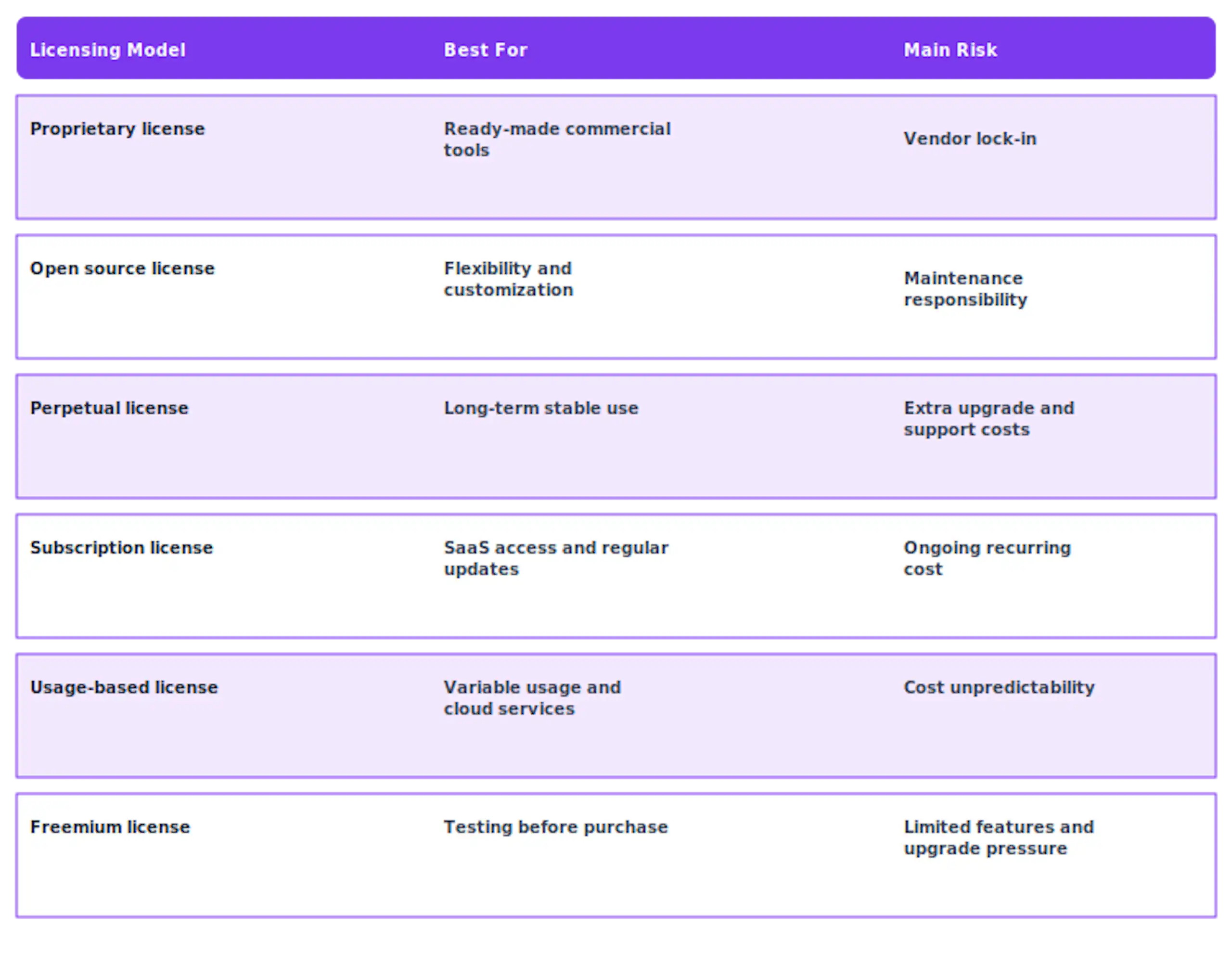
Software licensing models are important because they affect the real cost and control behind every software decision.
When you buy proprietary software, you may get speed and support, but less control.
When you use open source software, you may get flexibility and lower license fees, but more responsibility for setup and maintenance.
When you build custom software, you can decide how the system works, what tools it uses, and how much control your business keeps.
This does not mean every company should build from scratch. Many businesses should use off-the-shelf tools for standard functions. But when software supports a core workflow, customer experience, or competitive advantage, licensing and ownership become more important.
The better question is not just “Which tool is cheaper?” It is:
Will this license support the way our business needs to work over the next few years?
The right licensing model can reduce cost, protect ownership, and give your business more control as it grows. But when off-the-shelf tools create lock-in, limit your workflow, or make scaling harder, custom software may be the stronger long-term option.
Wazobia Technologies helps businesses plan, design, and build scalable software with full ownership, transparent delivery, and long-term product support.
Explore our custom software development partnership to build software that fits your business, not the other way around.
Before choosing a software licensing model, ask:
These questions help you avoid choosing software based only on the upfront cost.
Software licensing models can have a major impact on cost, flexibility, ownership, and long-term scalability.
A proprietary license can give your business speed and vendor support. An open source license can provide more control and customization. A perpetual license may reduce long-term subscription costs, while a subscription license can make software easier to access and maintain.
The right choice depends on what the software does for your business.
If it supports a common task, a licensed off-the-shelf tool may be enough. If it supports a strategic workflow, customer experience, or internal process that needs more control, it may be worth exploring custom software.
The best software decisions are not only about what a tool can do today. They are about whether the licensing model supports how your business needs to grow.
1. What are software licensing models?
Software licensing models define how users can access, use, pay for, modify, and distribute software.
2. What are the main types of software licenses?
The main types include proprietary licenses, open source licenses, perpetual licenses, subscription licenses, usage-based licenses, freeware, and freemium licenses.
3. What is a proprietary license?
A proprietary license allows users to use software owned by a vendor, but the source code remains private and controlled by the software owner.
4. What is the difference between perpetual and subscription license?
A perpetual license is usually a one-time purchase for long-term use. A subscription license requires recurring payments to keep using the software.
5. What are open source license types?
Common open source license types include MIT, Apache, GPL, BSD, and Mozilla Public License.
Keep Reading
Jul 23, 2026 · 8 min read
Compare a database vs spreadsheet for managing business data. Learn the signs that spreadsheets are limiting your workflow and what to use instead.

Jul 23, 2026 · 9 min read
Compare SQL vs NoSQL databases by structure, transactions, scalability and use case. Learn which architecture is right for your application.
.jpg_7DAeB8?tr=w-2560,f-webp,q-50)
Jul 23, 2026 · 8 min read
Find the best database for web applications based on SaaS, ecommerce, marketplace, real-time and content use cases. Compare the practical trade-offs.
© Wazobia Technologies 2026