
Jul 23, 2026 · 8 min read
Database vs Spreadsheet: When Should a Business Upgrade?
Compare a database vs spreadsheet for managing business data. Learn the signs that spreadsheets are limiting your workflow and what to use instead.
Services
Our service offers a team of engineers, designers, and QA specialists to achieve your goals.
See how it worksYou gain a team of experts including engineers, designers, and QA who drive your project.
See what our Dev team can build for you
Most businesses do not start with a software problem. They start with a delivery problem.
A startup is growing, but the team is still managing customers through spreadsheets, emails, and disconnected apps. A consulting firm has more clients than before, but every project update still requires manual follow-up. A finance, legal, recruitment, or advisory firm wants to improve client experience, but its internal workflow depends on five tools that do not properly talk to each other.
At first, this feels manageable. Then growth exposes the cracks.
What worked for 10 clients becomes painful at 50. What worked for a small internal team becomes chaotic when more people join. What looked like a low-cost tool starts creating hidden costs through manual work, duplicate data, slow reporting, and frustrated clients.
That is when decision makers begin asking the real question:
Should we buy ready-made software, build custom software, or invest in proprietary software that gives us more control?
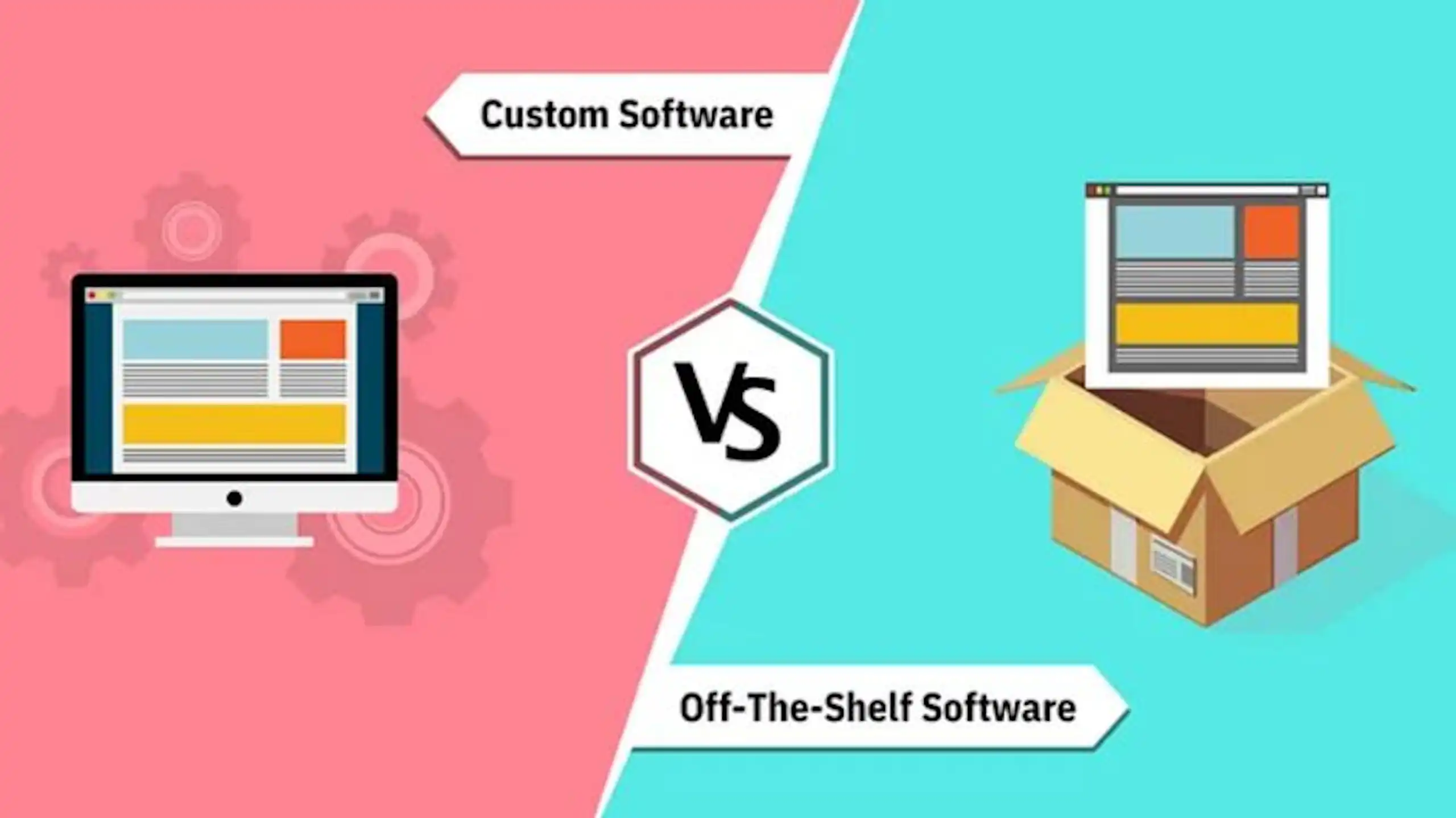
This guide explains the difference between custom software, off-the-shelf software, and proprietary software. It will help you compare the three options across cost, speed, ownership, scalability, and maintenance so you can make a confident build vs buy software decision.
A build vs buy software decision is not just a technical choice. It is a business decision about speed, cost, flexibility, ownership, and long-term control.
Buying software usually means choosing an existing off-the-shelf or SaaS product and adapting your workflow to fit it. Building software means creating a custom system designed around your business process, users, data, integrations, and growth goals.
Neither option is automatically better.
Buying is often the right move when the problem is common, the tool is affordable, and the software does not give your business a meaningful advantage. For example, most companies should not build their own email platform, accounting tool, payroll system, or basic file storage system. These needs are well served by existing products.
Building becomes more valuable when the workflow is specific, manual work is slowing the team down, integrations are breaking, or the customer experience depends on a process that generic software cannot support properly.
The best build vs buy software decision starts with a simple question:
Is this workflow standard, or is it strategic?
If the workflow is standard, buying can help you move faster and avoid unnecessary development cost. If the workflow is strategic, building may give your business more control, better efficiency, and a stronger long-term advantage.
For many growing companies, the answer is not purely build or buy. It is both.
Use off-the-shelf tools where they already work well. Build custom software where your process, customer experience, data, or competitive advantage needs more control. This is how businesses avoid overbuilding while still creating technology that supports real growth.
Many businesses search for custom software vs off the shelf because they feel stuck between two choices:
That comparison is useful, but it is not always complete.
There is a third option that often matters as the business becomes more strategic about technology: proprietary software.
Proprietary software is software owned and controlled by a company or vendor. Many off-the-shelf SaaS products are proprietary because the vendor owns the code, controls the roadmap, and licenses access to users. But your business can also own proprietary software if you build a private platform, internal system, or digital product that becomes a strategic asset.
So the real decision is not only:
Should we build or buy?
It is also:
Where do we need speed, flexibility, ownership, and long-term control?
Off-the-shelf software is a ready-made product built for a broad market. These tools are designed to solve common business needs such as accounting, communication, project tracking, CRM, HR, payroll, file storage, helpdesk support, or reporting.
Examples include tools like Slack, HubSpot, QuickBooks, Trello, Salesforce, Notion, Xero, Asana, Zendesk, and Google Workspace.
Off-the-shelf software is usually the fastest way to solve a standard problem. You sign up, configure the product, train your team, and start using it.
Commercial off-the-shelf software is typically packaged for general use and then configured to fit an organization’s needs, rather than being built from scratch for one company.
Off-the-shelf software works well when your business process is common and the software does not create a unique competitive advantage.
For example, a startup should not usually build its own accounting platform. A consulting firm probably does not need to build its own email system. A recruitment agency may not need a custom CRM at the beginning if an existing product handles the basics well.
In simple terms:
Buy software for standard business functions.
Custom software is built around the specific workflows, data, users, and goals of one business.
Instead of forcing your team to adapt to a generic tool, custom software adapts to how your business actually operates.
Custom software could be:
Custom software is often used when a company has outgrown generic tools, needs better integration, or wants to create a smoother internal or client-facing experience.
A good custom software development company does more than write code. It helps clarify the business problem, define the right features, design the user experience, build securely, test properly, launch the system, and support future improvements.

SaaS vs custom software is one of the most common versions of the build vs buy decision.
SaaS, or Software as a Service, is a cloud-based product you subscribe to and use through a browser or app. Most modern off-the-shelf software is SaaS. Tools for CRM, accounting, project management, HR, customer support, analytics, and marketing automation are often delivered this way.
The main advantage of SaaS is speed. You can sign up quickly, configure the product, invite users, and start working without building anything from scratch. SaaS also gives you access to ongoing updates, customer support, security improvements, and features developed for many users.
That makes SaaS a strong choice when your need is common and the available product solves most of the problem.
Custom software is different. It is designed around your business instead of around the average customer. It can match your exact workflow, integrate with the systems you already use, support your reporting needs, and create a smoother experience for your team or clients.
The trade-off is that custom software usually requires more planning, more upfront investment, and a development partner that understands both the business problem and the technical solution.
A SaaS product may be the better option when:
Custom software may be the better option when:
The practical answer is often to start with SaaS and build when the limits become expensive. SaaS helps you move quickly. Custom software helps you move with more control when your business has outgrown generic tools.
Bespoke software is another term for custom software. It is software designed specifically for one organization rather than a broad market.
The phrase bespoke software vs off-the-shelf is common when businesses want to compare a tailored system with a ready-made product.
The difference is simple:
Off-the-shelf software gives you a standard product that can usually be configured.
Bespoke software gives you a tailored system designed around your workflows, users, data, integrations, and growth goals.
This matters when your process is too specific, complex, or valuable to be managed well by a generic tool.
For example, a legal firm may need a secure client intake and case-management workflow. A consulting firm may need a private client portal for project visibility, approvals, and reporting. A logistics company may need dispatch software that reflects its exact routing, pricing, and delivery model.
In those situations, the software is not just a tool.
It becomes part of how the business delivers value.
Proprietary software is software that is owned, controlled, and licensed by a company, vendor, or individual owner. The owner controls the source code, usage rights, roadmap, updates, and distribution.
This is where some confusion happens.
Off-the-shelf software and proprietary software are not always opposites. Many off-the-shelf products are proprietary because they are owned by vendors and licensed to customers.
However, in business decision-making, proprietary software vs off-the-shelf is usually a question of control.
Do you want to use a vendor’s product, accept the vendor’s roadmap, and operate within its limits?
Or does the software need to become something your business owns, improves, protects, and differentiates with over time?
For example:
In these cases, the software is not just supporting the business. It is shaping how the business creates value.
Off-the-shelf software is often the right choice when speed matters more than uniqueness.
It works well when:
For startups, this is especially important.
Building too early can drain cash, delay launch, and distract the team from finding product-market fit. If a ready-made tool helps you test the business, serve customers, and learn quickly, buying is often the smarter move.
For professional services firms, off-the-shelf software can also be useful for standard operations such as accounting, email, document storage, calendar scheduling, payroll, and basic project management.
The key is to avoid building what already works well in the market.
Off-the-shelf software becomes limiting when your business has to bend its process to fit the tool.
At first, the tool may feel affordable and convenient. Then your business grows, your team adds more users, your workflows become more specific, and your clients expect a smoother experience.
The warning signs are usually clear:
This is the cost of doing nothing.
Not just wasted subscription fees. The bigger cost is lost capacity, slower delivery, weaker client experience, operational risk, and missed growth opportunities.
A useful point raised in real-world build vs buy software discussions is that buying can be the better choice when a vendor product does the job well, but it becomes risky when the vendor controls a core part of business success, pricing, roadmap, or availability.
That is where many growing businesses get stuck.
The tool was cheap at first. Then more users were added. Then integrations became necessary. Then reporting required extra work. Then the vendor changed pricing. Then one missing feature blocked a key workflow.
At that point, the business is not just using software.
It is being constrained by it.
Custom software becomes the better option when your workflow is directly tied to growth, service quality, revenue, or customer experience.
It is usually the right fit when:
For professional services firms, this can be especially powerful.
A management consultancy may need a client portal that tracks project progress, documents, approvals, milestones, and insights. A legal firm may need a secure workflow for client intake, case updates, document management, and internal approvals. An accounting firm may need dashboards that help clients understand performance without waiting for monthly reports.
These are not just “software features.”
They are service delivery improvements.
For startups, custom software becomes important when the product itself is the business, or when the customer experience cannot be delivered properly through existing tools.
Proprietary software is the right direction when software is not just supporting the business, but shaping the value of the business.
This matters when the system gives your company control, differentiation, or defensibility.
You should consider proprietary software when:
For example, a consulting firm may start with off-the-shelf project management tools. Over time, it may realize that its methodology, client reporting, and insight delivery are what make the firm different. Building a proprietary client platform could turn that expertise into a stronger client experience and a more defensible business model.
A startup may begin by stitching together no-code tools and SaaS products. But once it validates demand, it may need a proprietary platform to improve performance, own the user experience, and scale reliably.
The decision is not about building for the sake of building.
It is about owning the part of the software that makes your business more valuable.
The most common mistake in a build vs buy software decision is comparing only the initial price.
Off-the-shelf software usually looks cheaper at the start. Custom software and proprietary software usually require more planning and upfront investment.
But the better question is:
What will this decision cost us over the next three years?
When comparing options, include:
A ready-made product may be cheaper in year one but expensive by year three if your team spends hundreds of hours working around it.
Custom software may cost more upfront but create stronger long-term value if it removes repeated manual work, improves client experience, reduces operational risk, and helps the business serve more customers without increasing headcount at the same rate.
Proprietary software may require the most commitment, but it can also become a business asset if it supports product revenue, operational scale, or market differentiation.
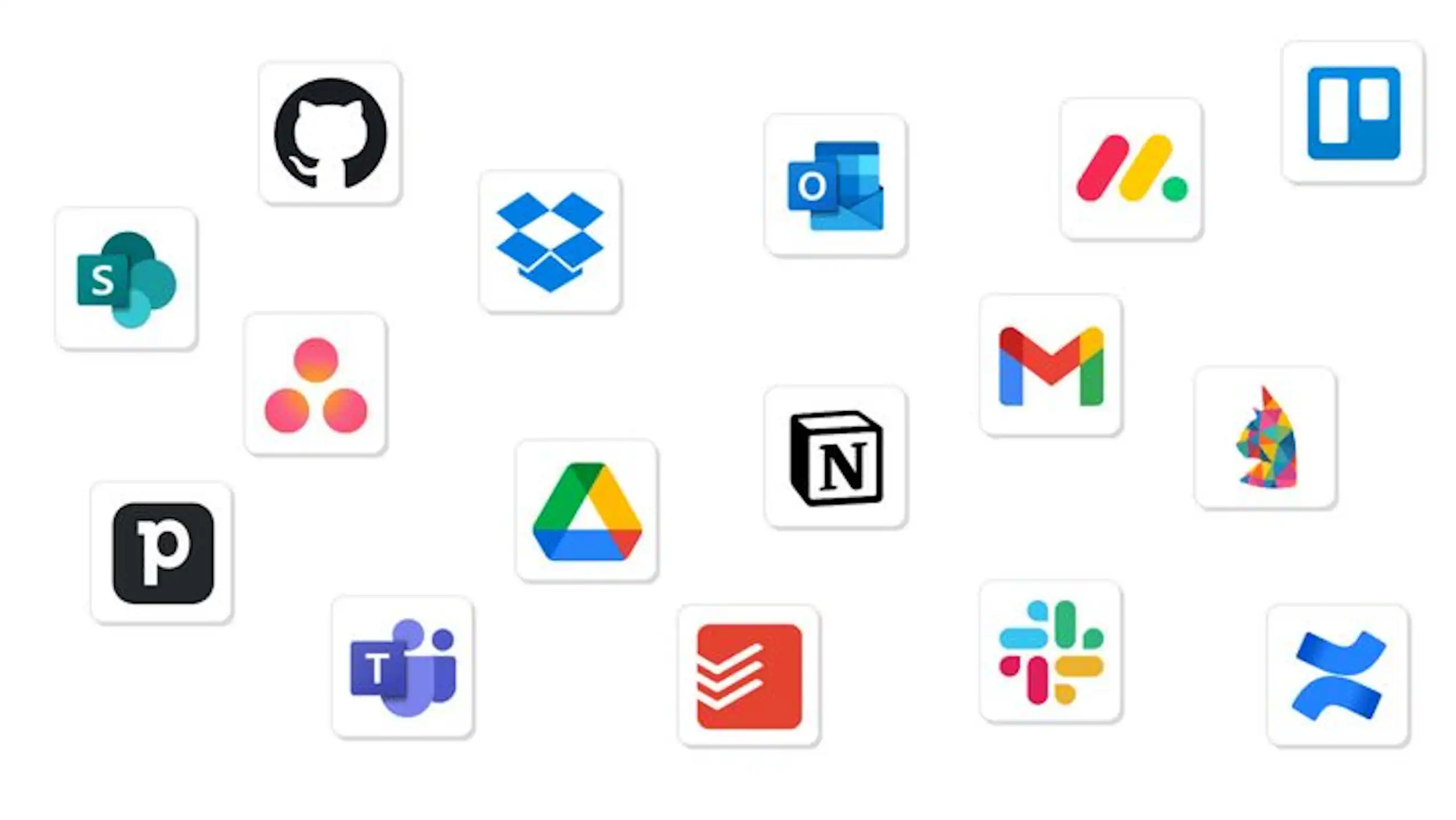
When comparing custom software and off-the-shelf software, the initial price rarely tells the full story. A better way to evaluate the decision is to look at the total cost of ownership software creates over time.
Total cost of ownership includes every cost connected to using, maintaining, adapting, supporting, and replacing the software. This matters because the cheapest option at the beginning is not always the cheapest option after two or three years.
Off-the-shelf software often looks affordable because the starting price is clear. You may pay a monthly subscription, add a few users, and begin using the product quickly. But as the business grows, hidden costs can appear.
These costs may include:
For a small team, these costs may be manageable. For a growing business, they can become significant. A tool that costs little at the start can become expensive if it forces your team to spend hours every week fixing gaps the software does not solve.
Custom software has a different cost profile. It usually requires a higher upfront investment because the system is planned, designed, built, tested, and improved around your business. But once the right system is in place, it can reduce recurring inefficiencies, automate repeatable work, improve reporting, and support growth without adding the same level of operational complexity.
The real question is not simply:
Which option costs less today?
The better question is:
Which option creates the most value over the next three to five years?
If off-the-shelf software solves the problem well, it may have the lower total cost of ownership. But if your team is paying for multiple tools, repeating manual tasks, dealing with poor integrations, and losing time to inefficient workflows, custom software may become the more cost-effective long-term choice.
A strong software development partner can help you calculate this properly before you build. The goal is not to spend more on development. The goal is to understand whether custom software will remove enough cost, risk, and friction to justify the investment.
There is no single answer that works for every business.
The right choice depends on how important the workflow is, how unique your process is, how much control you need, and how quickly you need the solution.
Choose Off-the-Shelf Software If:
This is often the right choice for accounting, payroll, email, basic CRM, task management, document storage, scheduling, and other standard business functions.
Choose Custom Software If:
This is often the right path for growing startups and professional services firms that have moved beyond simple tools and need a more tailored operating system.
Choose Proprietary Software If:
This is usually the right direction when software becomes central to how your business creates, delivers, or captures value.
Choose a Hybrid Approach If:
For many businesses, the smartest answer is not one option. It is a hybrid.
Use off-the-shelf tools for standard functions. Build custom or proprietary software around the workflows that make your business different.
For example:
This approach reduces unnecessary development cost while giving your business control where it matters most.
The strongest businesses do not build everything.
They build what matters.

If you are unsure what to do, ask these five questions.
1. Is this workflow standard or unique?
If the workflow is standard, off-the-shelf software is usually enough.
If the workflow is unique, complex, or tied to how you deliver value, custom software may be a better fit.
2. Does this software affect revenue or client experience?
If the software only supports internal admin, buying may be enough.
If it directly affects sales, delivery, onboarding, reporting, retention, or client trust, you may need more control.
3. Are workarounds becoming normal?
One workaround is manageable. Ten workarounds are a warning sign.
If your team depends on spreadsheets, duplicate data entry, manual reminders, and disconnected reports, the software is no longer solving the problem properly.
4. What happens if the vendor changes pricing or features?
Vendor dependency is not always bad. It becomes risky when the vendor controls something central to your business.
If a pricing change, feature removal, API restriction, or product shutdown would seriously affect operations, it may be time to consider custom or proprietary software.
5. Will this system need to evolve with the business?
If your business model, customer journey, or service delivery process is evolving quickly, a flexible custom system may support growth better than a rigid off-the-shelf tool.
Knowing when to build custom software is just as important as knowing what to build.
Many businesses start with off-the-shelf tools because they are fast, affordable, and easy to adopt. That is usually the right move in the early stage. But as operations become more complex, the same tools that helped the business move quickly can begin to slow it down.
You may have outgrown off-the-shelf software if several of these signs are becoming normal:
These are signals that the business problem has changed.
At the beginning, the goal may have been to get organised. Later, the goal may be to scale delivery, improve client experience, reduce manual work, or create a system that competitors cannot easily copy.
That is when custom software becomes worth considering.
You do not need to build everything at once. In many cases, the safest path is to begin with a discovery phase. Map the workflow, identify the biggest bottlenecks, calculate the cost of inefficiency, and decide which parts should remain off-the-shelf and which parts should be custom-built.
A good custom software development partner will not push you to build unnecessarily. The right partner will help you decide where buying still makes sense, where custom development can create measurable value, and how to build in phases so the investment stays practical.
The strongest build vs buy decisions are not driven by trends. They are driven by business evidence.
If your current tools still support your growth, keep using them. If they are creating friction, limiting visibility, weakening client experience, or forcing your team into constant workarounds, it may be time to build software around the way your business actually works.
Startups need speed, learning, and focus.
In the early stage, off-the-shelf software can help you move quickly without overcommitting resources. Use existing tools to test workflows, validate demand, manage customers, and understand what the business really needs.
But as the startup grows, the limits become clearer.
At some point, the product experience, data structure, automation, or customer journey may need to become more specific. That is when custom software can help you move from validation to scale.
The best path is often:
This reduces the risk of building too early while still giving the startup a path toward long-term control.
Professional services firms often compete on trust, expertise, speed, and client experience.
But many firms still deliver that experience through manual processes: email threads, spreadsheets, document folders, disconnected project tools, and repeated follow-ups.
That creates friction for both the team and the client.
Custom or proprietary software can help professional services firms improve:
For a consulting, legal, finance, recruitment, or advisory firm, the right software can make the business feel more professional, more scalable, and easier to trust.
This does not mean replacing every tool.
It means identifying the workflows that shape client confidence and building better systems around them.
This is also how strong thought leadership supports B2B buying. The Edelman-LinkedIn B2B Thought Leadership report highlights how buying decisions are influenced by wider internal groups, not just one visible decision-maker. For software decisions, that means the right solution needs to make sense to leadership, finance, operations, technical teams, and end users.
Mistake 1: Building Too Early
Not every business needs custom software from day one.
If the process is still unclear, the market is unvalidated, or the business model may change quickly, off-the-shelf tools can help you learn faster.
Mistake 2: Buying Too Long
Off-the-shelf software can become expensive when teams keep adding tools to fix problems created by other tools.
If your business is paying for multiple subscriptions but still relying on manual work, it may be time to reassess.
Mistake 3: Ignoring Ownership
Ownership matters when software becomes strategic.
If your business depends heavily on a vendor’s product, pricing, integrations, and roadmap, you need to understand the risk.
Mistake 4: Comparing Cost Without Measuring Waste
A cheaper tool is not cheaper if it creates hours of manual work every week.
Measure the cost of inefficiency, not just the cost of software.
Mistake 5: Treating Software as an IT Project Only
The best software decisions involve leadership, operations, finance, customer-facing teams, and end users.
Software affects how work gets done. It should be planned as a business decision, not just a technical purchase.
Off-the-shelf software helps businesses start faster.
Custom software helps businesses scale better when workflows, integrations, reporting, or client experience become too important to leave inside generic tools.
Proprietary software helps businesses gain deeper control when software becomes part of their competitive advantage, product strategy, or long-term company value.
For startups, the right path may be to buy first, validate demand, then build what creates differentiation.
For professional services firms, the right path is often to modernise the workflows that directly affect delivery, client trust, and operational efficiency.
The goal is not to build everything.
The goal is to choose the right level of control for the right part of your business.
If your team is outgrowing spreadsheets, disconnected tools, manual workflows, or vendor limitations. At Wazobia Technologies, we can help you plan, design, and build software that supports real business growth.
Get a free consultation to figure out whether off-the-shelf, custom, proprietary, or hybrid software is the right fit for your next stage of growth.
1. What is the difference between custom software and off-the-shelf software?
Off-the-shelf software is a ready-made product built for a broad market. Custom software is built around the specific workflows, users, data, and goals of one business. Off-the-shelf software is usually faster and cheaper to start with, while custom software offers more flexibility and control when your business has unique needs.
2. What is proprietary software vs off-the-shelf software?
Proprietary software is software owned and controlled by a company or vendor. Off-the-shelf software is ready-made software sold to many users. Many off-the-shelf products are proprietary because the vendor owns the code and licenses access to customers. However, a business can also own proprietary software if it builds a private platform or product that it controls.
3. Is custom software always better than off-the-shelf software?
No. Custom software is not always the best first move. Off-the-shelf software is often better when your business needs a quick, affordable tool for common tasks like accounting, email, project management, payroll, or basic CRM. Custom software becomes the better choice when your workflow is unique, your team has too many manual workarounds, or existing tools are limiting growth.
4. How do I decide between build vs buy software?
Start by asking whether the workflow is standard or strategic. Buy software when the problem is common and existing tools solve it well. Build software when the workflow is unique, directly affects revenue or client experience, or creates competitive advantage. If some parts are standard and others are unique, a hybrid approach may be best.
5. Can a business use all three models?
Yes. Many growing businesses use all three. They buy off-the-shelf tools for standard functions, build custom software for unique workflows, and develop proprietary software for the systems that create long-term business value.
6. What should I look for in a custom software development company?
Look for a partner that understands business goals before writing code. A good custom software development company should help you define the problem, map workflows, prioritize features, design a user-friendly experience, build securely, test properly, and support the product after launch.
7. What is the safest way to start with custom or proprietary software?
The safest way is to begin with discovery. Before building anything, map your current workflow, identify bottlenecks, define must-have features, estimate the value of solving the problem, and decide what should be bought, built, or owned. This helps avoid overbuilding and ensures the software supports real business growth
Keep Reading
Jul 23, 2026 · 8 min read
Compare a database vs spreadsheet for managing business data. Learn the signs that spreadsheets are limiting your workflow and what to use instead.

Jul 23, 2026 · 9 min read
Compare SQL vs NoSQL databases by structure, transactions, scalability and use case. Learn which architecture is right for your application.
.jpg_7DAeB8?tr=w-2560,f-webp,q-50)
Jul 23, 2026 · 8 min read
Find the best database for web applications based on SaaS, ecommerce, marketplace, real-time and content use cases. Compare the practical trade-offs.
© Wazobia Technologies 2026